GO7 API DOCUMENTATION

| Change Description | Changed By | Change Date |
|---|---|---|
AirShopping and OfferPrice: fare-brand content. PriceClass carries Desc and DisplayOrderText; each service a brand includes is a ServiceDefinition (SD-FB<n>) and a price-less Service on the flight OfferItem; an empty PriceClassList is no longer returned (GH-8250) |
Apiluck Dokkaew | 2026-11-19 |
Postman: every request’s DistributionChain now uses the OrgRole, partnerName and partnerId environment variables, added to both environments; the on-hold OrderCreate [Pay Later] requests carry salesAgentId so their OT payment works on AeroCRS airlines (GH-8269) |
Apiluck Dokkaew | 2026-11-17 |
Breaking: deposit account payment (OT) now requires the ACCOUNT_REF:<value> prefix in RemarkText; a bare value is rejected (GH-8878) |
Apilak Dokkaew | 2026-11-17 |
OrderCreate: optional SalesAgent/SalesAgentID on the partner’s own DistributionChainLink; deposit payment (OT) on AeroCRS airlines requires it, at booking or later via OrderChange (GH-8800) |
Apiluck Dokkaew | 2026-11-12 |
| Remove cash as an OTA payment option and update payment examples | Sittiwet Mahapratoom | 2026-11-05 |
| Use assigned NDC Gateway base URLs and API keys in partner and endpoint guidance; document AeroCRS whole-booking cancellation | Sittiwet Mahapratoom | 2026-11-05 |
PayloadAttributes with a per-message CorrelationID is required on every NDC message: fields echoed, element order, CorrelationID returned as Error/ErrorID (GH-8220) |
Naphachara Rattanawilai | 2026-10-19 |
| Deeplink: URL pattern example; offers without an agreement use the partner’s agreement with the airline (GH-8052) | Naphachara Rattanawilai | 2026-10-16 |
| AirShopping: document the offer booking deeplink, agreement template override and template variables (GH-8427) | Naphachara Rattanawilai | 2026-10-15 |
| DistributionChain must identify the calling partner on every NDC message (GH-8269) | Naphachara Rattanawilai | 2026-10-14 |
| NDC requests send only the x-api-key header; x-tenant and x-SalesChannel removed from docs and the Postman collection (GH-8269) | Naphachara Rattanawilai | 2026-10-15 |
Added AirlineProfile (IATA NDC 21.3): airport pairs each airline serves, by airline (OwnerCode) |
Andrii Denysenko | 2026-10-06 |
Added Postman folder UseCase - VI and the NDC-VI environment for Virtual Interline (GH-8184) |
Apiluck Dokkaew | 2026-10-06 |
| Name change: one OrderChange with payment (no separate payment OrderChange) (GH-8162) | Naphachara Rattanawilai | 2026-09-24 |
| Cancel booking flow has no OrderQuote; removed OrderQuote cancel section (GH-8162) | Naphachara Rattanawilai | 2026-09-24 |
| Removed phase wording from scenario sections; OrderQuote required where used; name change has no OrderQuote (GH-8162) | Naphachara Rattanawilai | 2026-09-22 |
AirShopping: document CabinTypeCode filter and required PrefLevel (ET-58650) |
Naphachara Rattanawilai | 2026-08-19 |
| Production base URL updated (GH-7540) | Naphachara Rattanawilai | 2026-08-04 |
| OrderChange: call OrderRetrieve and reuse PaxIDs before the next process (GH-7531 / GH-7171) | Naphachara Rattanawilai | 2026-08-04 |
SeatAvailability: document multiple OfferItemRefID per seat — partner guidance (GH-7532 / GH-7253) |
Naphachara Rattanawilai | 2026-08-04 |
OrderCreate supports combined OfferPrice OfferID (composite flight + service + seat) |
Naphachara Rattanawilai | 2026-08-03 |
Added OrderChange payment with credit card and debit/credit account (OT + RemarkText account ID) |
Naphachara Rattanawilai | 2026-07-27 |
| Phase 2 by-offer: OfferPrice only after SeatAvailability/ServiceList; instant-pay note; mixed seat+service flow | Jarun Jiamtaweeboon | 2026-07-23 |
| Updated OfferPrice for Phase 2 combined flight + service / seat pricing | Jarun Jiamtaweeboon | 2026-07-22 |
| Updated Phase 2 add-ancillary flows, workflow images, credit-card PCI payment | Naphachara Rattanawilai | 2026-07-20 |
| Updated Postman collection with Phase 2 endpoints | Tyler Thorin | 2026-05-19 |
| Added Phase 2 to the document | Tyler Thorin | 2026-05-12 |
| Prepared Postman collection and update API request/response example | Thotsaphorn Phonlabutr | 2026-05-08 |
| Initial creation of the document | Naphachara Rattanawilai | 2026-05-06 |
This document outlines generic integration with the Go7 NDC Gateway using IATA NDC Offers & Orders XML messages. Schema distribution 21.3 is exposed under the HTTP path /v21.3.5. Per-message field references also live under ndc/endpoints/.
Requests use XML bodies with Content-Type: application/xml (or application/xml;charset=UTF-8). HTTP headers and authentication describes tenant/channel headers and API key usage.
Obtain your assigned NDC Gateway base URL and API key from GO7 for the environment you are using. All Offers & Orders messages documented here are posted to:
{NDC_GATEWAY_BASE_URL}/v21.3.5/{MessageName}
Replace the placeholders with your assigned base URL and message name (for example, AirShopping).
Attach the following headers to NDC Gateway requests unless an endpoint page specifies otherwise.
| Header | Description | Example |
|---|---|---|
x-api-key |
API key authentication (required) | {x-api-key} |
Content-Type |
Request body type | application/xml |
Send only x-api-key and Content-Type. The API key alone identifies the caller; the gateway resolves the airline, account and sales channel from it.
These scenarios cover shopping and pricing offers, creating or confirming orders, reshop/requote paths, order retrieval, and adding ancillary seats and services using either offer context (price into OrderCreate) or order context (OrderQuote then OrderChange).
| Scenario | Message sequence |
|---|---|
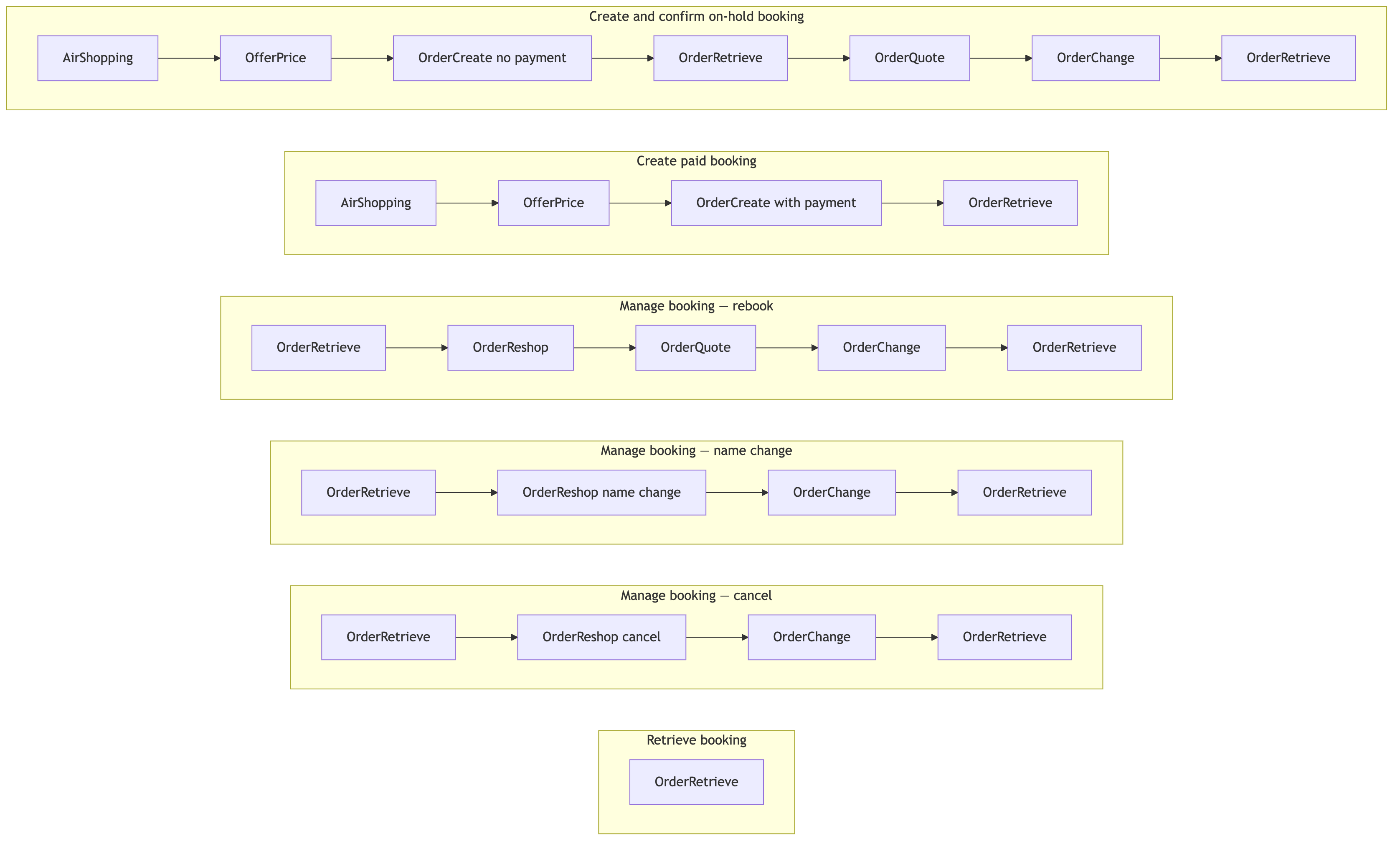
| Create & confirm on-hold booking | AirShopping → OfferPrice → OrderCreate(no payment) → OrderRetrieve → OrderQuote → OrderChange → OrderRetrieve. |
| Create paid booking | AirShopping → OfferPrice → OrderCreate (with payment) →OrderRetrieve. |
| Create zero-amount booking | AirShopping → OfferPrice → OrderCreate (no PaymentFunctions) → OrderRetrieve. Total due is 0, so the gateway autopays it and the order returns OPEN. |
| Manage booking — rebook | OrderRetrieve → OrderReshop → OrderQuote → OrderChange → OrderRetrieve. |
| Manage booking — name change | OrderRetrieve → OrderReshop (name change) → OrderChange (with payment) → OrderRetrieve. No OrderQuote — one OrderChange accepts the reshop offer and pays for it. |
| Manage booking — cancel | OrderRetrieve → OrderReshop (cancel) → OrderChange → OrderRetrieve. No OrderQuote — OrderChange accepts the cancel offer directly. |
| Retrieve booking | OrderRetrieve (view only). |
Scenario flow (NDC Gateway — NDC Workflow Process, booking and servicing). Source Mermaid: scenario flow diagram source.
IATA OrderRetrieveRQ is mapped to internal order REST reads (UUID vs record locator + traveler name): see Order Retrieve mapping.
Partner note — refresh PaxID after OrderChange: PaxID values may change between responses after an OrderChange (for example after adding SSRs or confirming payment). If the integration continues with another step (payment, add seat/SSR, reshop, another change), call OrderRetrieve first, read the current PaxList/Pax/PaxID (and related refs) from the retrieve response, and use those IDs in the next request. Do not reuse PaxID values from an earlier OrderCreateRS or previous OrderChangeRS across steps.
These build on the same base flow as the booking and servicing scenarios, adding seat and service selection.
| Scenario | Message sequence |
|---|---|
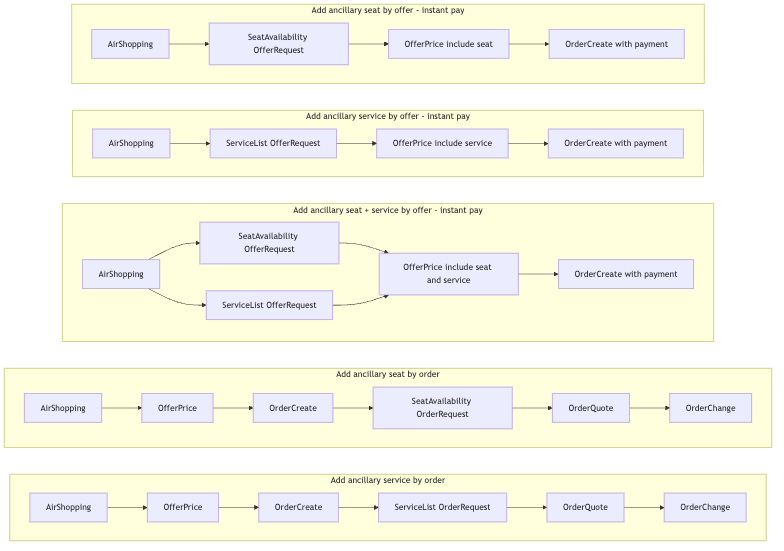
| Add ancillary seat by offer | AirShopping → SeatAvailability (OfferRequest) → OfferPrice (flight + seat) → OrderCreate (with payment). |
| Add ancillary service by offer | AirShopping → ServiceList (OfferRequest) → OfferPrice (flight + service) → OrderCreate (with payment). |
| Add ancillary seat + service by offer | AirShopping → SeatAvailability + ServiceList (OfferRequest) → OfferPrice (flight + seat + service) → OrderCreate (with payment). |
| Add ancillary seat by order | AirShopping → OfferPrice → OrderCreate → SeatAvailability (OrderRequest) → OrderQuote → OrderChange → OrderRetrieve. |
| Add ancillary service by order | AirShopping → OfferPrice → OrderCreate → ServiceList (OrderRequest) → OrderQuote → OrderChange → OrderRetrieve. |
Remark: By-offer ancillary flows are instant pay (OrderCreate with PaymentFunctions). For pay-later / on-hold, use the booking and servicing scenarios (AirShopping → OfferPrice → OrderCreate without payment), then add ancillaries via the by-order rows above.
When you add a seat or SSR whose amount due is 0 to an existing order (by order), the gateway pays it automatically with Autopayment. Nothing is charged.
OrderRetrieve → SeatAvailability / ServiceList (OrderRequest, item priced 0) → OrderQuote (amount due 0) → OrderChange without PaymentFunctions → OrderRetrieve.
OrderChange accepts the quoted offer, autopays the 0 amount and confirms the seat or SSR. The response has no pending payment.PaymentFunctions is sent anyway, it is ignored for a zero amount (no card or account is charged).OrderQuote and OrderChange; only the payment step is dropped.OrderCreate (returned OPEN, not held DRAFT) and to paying an on-hold order whose balance is 0.PaymentFunctions as usual.More detail: NDC Partner Guide → Zero-amount orders (Autopayment).
Remark — multi-step OrderChange: when chaining changes on an existing order (for example add SSR then pay), insert OrderRetrieve between steps and use the latest PaxID values: … → OrderChange (add SSR) → OrderRetrieve → OrderChange (payment).
Remark — SeatAvailability offer items: a seat in SeatAvailabilityRS may return multiple OfferItemRefID values (for example different passenger eligibility). See Seat Availability.
Scenario flow (NDC Gateway — NDC Workflow Process, ancillaries).
Use IATA OffersAndOrders message XML (IATA_AirShoppingRQ, IATA_OrderCreateRQ, etc.) as shown in each endpoint document. Official XSDs are published by IATA for distribution 21.3; align payloads with the examples in ndc/endpoints/.
Airline Profile schemas. The package below does not contain the AirlineProfile message schemas. Download IATA_AirlineProfileRQ.xsd and IATA_AirlineProfileRS.xsd; they import IATA_OffersAndOrdersCommonTypes.xsd from the package.
Download the IATA schema distribution 21.3 package used by GO7 gateway v21.3.5
Download Postman Collection Download Postman Environment Download Postman Environment for Virtual Interline (NDC-VI)
Set the x-api-key and ndc-gateway-url environment variables to the values assigned by GO7. The environment files default to a development URL; replace it if your assigned URL differs.
Every request fills DistributionChain from three environment variables: set partnerId to your Partner ID, OrgRole to Seller (Sales agreement) or Distributor (Network agreement), and partnerName to your organisation name. See Partner identification (DistributionChain).
Deposit payment on AeroCRS airlines also needs salesAgentId and debitCreditAccount: the request UseCase/Create paid booking/OW - 1ADT 1CHD 1INF/3.1. OrderCreate [OW] [1ADT, 1CHD, 1INF] [Pay] [DEPOSIT], and 6.2. OrderChange … [Pay] [DEBIT] in UseCase/Create & confirm on-hold booking, whose 3. OrderCreate … [Pay Later] carries salesAgentId because it cannot be added after the order is created. Leave salesAgentId empty for other airlines: a blank value has no effect. See Deposit payment on AeroCRS airlines.
The collection carries a second top-level folder, UseCase - VI, for a Virtual Interline sale: one itinerary stitched from two carriers on two reservation systems, sold and paid as one NDC order. Use it with the NDC-VI environment and your VI API key (the key selects the tenant and the sales channel). It covers Create & confirm on-hold booking, Create paid booking, Retrieve booking and the ancillary flows (Ancillary Offer - Services / Seats before booking, Ancillary Order - Services / Seats on an existing order). A VI offer has one offer item per passenger per leg (OW 6, RT 12); the folder’s scripts select every item and read all ids from the previous response, so nothing is hard-coded and a request whose inputs are missing is not sent. Cancel, cancel segment, rebook and name change are not included because they are not supported on VI; the folder description lists the known limits per use case.
| Code | Description |
|---|---|
| ADT | Adult |
| CHD | Child |
| INF | Infant |
Hub cabin codes (not numeric PADIS values such as 5). Used on AirShopping as OriginDestCriteria.CabinType.CabinTypeCode and returned on FareComponent.CabinType.CabinTypeCode.
| Code | Description |
|---|---|
| Y | Economy |
| C | Business |
| F | First |
| W | Premium economy |
| M | Miscellaneous (accepted, not used in practice) |
When CabinType is present on AirShopping, IATA NDC 21.3 requires PrefLevel/PrefLevelCode (minOccurs=1). Missing either field returns IATA error 13. Use Required to keep only matching cabin offers per origin-destination. Preferred is sent to offer search but does not drop other cabins. Invalid cabin codes return IATA error 14.
| Code | Description |
|---|---|
| PP | Passport |
| ID | National ID |
| DL | Driver’s License |
| FP | Frequent Flyer |
| Code | Type | Description |
|---|---|---|
| 12 | VALIDATION | Invalid value |
| 13 | VALIDATION | Missing required field |
| 14 | VALIDATION | Value not supported in this position |
| 39 | VALIDATION | Data element too long |
| 40 | VALIDATION | Data element too short |
| 903 | VALIDATION | Unable to process - syntax error |
| 914 | VALIDATION | Invalid format |
| 915 | VALIDATION | No action - cannot support function |
| 911 | BUSINESS | Unable to process - system error |
| 913 | APPLICATION | Item/data not found |
| 486 | APPLICATION | Specific seat requested not available |
| 304 | SYSTEM | System Temporarily Unavailable |
| 900 | SYSTEM | Inactivity Time Out Value Exceeded |
| 901 | SYSTEM | Communications Line Unavailable |
| 916 | SYSTEM | EDIFACT/XML version not supported |
| 305 | SECURITY | Security/Audit Failure |
Codes 12 and 13 on Request.DistributionChain (partner keys) are explained in Partner identification (DistributionChain).
Same pattern as OTA for Reservation workflow: this section is an index only. Each step links to the endpoint reference page where requests, responses, and scenario anchors live. See HTTP headers and authentication.
Optionally start with AirlineProfile to list the airport pairs an airline serves. Typical chain: AirShopping → OfferPrice → OrderCreate, then OrderRetrieve / OrderReshop / OrderQuote / OrderChange as needed (see Booking and servicing scenarios). Ancillaries by offer: AirShopping → SeatAvailability and/or ServiceList → OfferPrice (flight + selected extras) → OrderCreate (instant pay). Ancillaries by order: create the order first, then SeatAvailability / ServiceList (OrderRequest) → OrderQuote → OrderChange → OrderRetrieve (see Ancillary seat and service scenarios). After any OrderChange, call OrderRetrieve before the next process and use the latest PaxID values.
| API | Base URL | Message path pattern |
|---|---|---|
| Offers & Orders API | {NDC_GATEWAY_BASE_URL} |
/v21.3.5/{MessageName} |
POST …/AirlineProfile · airport pairs each airline serves, before AirShopping
POST …/AirShopping · IATA_AirShoppingRQ / RS
POST …/OfferPrice · priced offer for OrderCreate (flight-only, or combined with selected service / seat)
POST …/OrderCreate · accept priced offer; optional payment; echo composite OfferPrice OfferID when flight was priced with seat/SSR
SalesAgentID on your own DistributionChainLinkPOST …/SeatAvailability · optional seat map and seat offer lookup; a seat may return multiple OfferItemRefID values
POST …/ServiceList · optional ancillary service lookup
POST …/OrderRetrieve · current order view; required before the next process after OrderChange to refresh PaxID
POST …/OrderReshop · alternatives for rebook, name change, or cancel
POST …/OrderQuote · quote before OrderChange
POST …/OrderChange · pay DRAFT, or accept quoted / rebook offers; after success, call OrderRetrieve before the next step
SecurePaymentVersion2)curl -X POST "{NDC_GATEWAY_BASE_URL}/v21.3.5/{MessageName}" \
-H "x-api-key: {x-api-key}" \
-H "Content-Type: application/xml" \
--data-binary @request.xml
Replace {NDC_GATEWAY_BASE_URL} with your assigned base URL and {MessageName} with AirlineProfile, AirShopping, OfferPrice, OrderCreate, etc.
If your API key identifies a partner, every NDC message must name you in DistributionChain: AirlineProfile, AirShopping, OfferPrice, OrderCreate, OrderRetrieve, OrderChange, OrderReshop, OrderQuote, ServiceList and SeatAvailability. API keys that do not identify a partner are not affected.
Rules
DistributionChainLink as ParticipatingOrg/OrgID. It is compared ignoring upper/lower case and surrounding spaces.OrgRole must match your agreement:| Your agreement | OrgRole on your link |
|---|---|
| Sales | Seller |
| Network | Distributor |
| Sales and Network | Seller or Distributor |
| Marketplace / Tour Operator only | Any (only the Active-agreement check applies) |
OrgRole Carrier never count as your link. Name is not checked.<DistributionChain>
<cns:DistributionChainLink>
<cns:Ordinal>1</cns:Ordinal>
<cns:OrgRole>Seller</cns:OrgRole>
<cns:ParticipatingOrg>
<cns:Name>Your company</cns:Name>
<cns:OrgID>7f9c2b1e-3a4d-4e5f-8a6b-1c2d3e4f5a6b</cns:OrgID>
</cns:ParticipatingOrg>
</cns:DistributionChainLink>
</DistributionChain>
Errors — checked in this order; each returns HTTP 400 with an Error in that message’s response (for example IATA_AirShoppingRS).
| Case | Code | DescText | TagText |
|---|---|---|---|
DistributionChain missing |
13 | Missing required field: Request.DistributionChain |
Request.DistributionChain |
No DistributionChainLink |
13 | Missing required field: Request.DistributionChain.DistributionChainLink |
Request.DistributionChain.DistributionChainLink |
| No Active agreement with any airline you may sell | 12 | Partner has no active agreement |
Request.DistributionChain |
Your Partner ID is not in a non-Carrier link |
12 | DistributionChain does not contain the authenticated partner |
Request.DistributionChain |
Your link has the wrong OrgRole |
12 | OrgRole must be Seller for the authenticated partner (or Distributor, or Seller or Distributor, per your agreement) |
Request.DistributionChain.DistributionChainLink[i].OrgRole |
If your agreements cannot be checked at that moment, the API returns that HTTP status with Code 911 (system error). The request is not processed; retry later.
On OrderCreate you can name the agent user who sells the booking. Add SalesAgent/SalesAgentID to your own link, after ParticipatingOrg. The value is the ID of an agent user in the airline’s reservation system. It is optional, except for a deposit payment on an AeroCRS airline, which requires it.
<DistributionChain>
    <cns:DistributionChainLink>
        <cns:Ordinal>1</cns:Ordinal>
        <cns:OrgRole>Seller</cns:OrgRole>
        <cns:ParticipatingOrg>
            <cns:Name>Your company</cns:Name>
            <cns:OrgID>7f9c2b1e-3a4d-4e5f-8a6b-1c2d3e4f5a6b</cns:OrgID>
        </cns:ParticipatingOrg>
        <cns:SalesAgent>
            <cns:SalesAgentID>21175</cns:SalesAgentID>
        </cns:SalesAgent>
    </cns:DistributionChainLink>
</DistributionChain>
Keep the schema order inside the link: Ordinal, OrgRole, ParticipatingOrg, SalesAgent, SalesBranch.
When it is used
OrderCreate, and only when your API key identifies a partner.OrgRole is not Carrier, and ParticipatingOrg/OrgID is your Partner ID (compared ignoring upper/lower case and surrounding spaces).21175 belongs to agency 71138.When it has no effect — the request is processed as if SalesAgentID were absent, and no error is returned:
Carrier link or on another organisation’s link.OrderChange or on any message other than OrderCreate. It cannot be added to an existing order.Send PayloadAttributes on every NDC message, with a CorrelationID in it. Both are required for integration with the GO7 NDC Gateway.
The IATA schema itself declares PayloadAttributes minOccurs="0", and the gateway does not currently reject a request that leaves it out — such a request is processed normally. That is not a reason to omit it: without a CorrelationID there is nothing that ties a response, or a line in the gateway’s logs, back to the request you sent, and a problem report that cannot be traced to a call cannot be investigated.
What the gateway does with it
CorrelationID is also written to the gateway’s own logs, and on a failure it comes back as Error/ErrorID in the error response. Quote it when you report a problem.Error element only — no PayloadAttributes is echoed on a failed request.PayloadAttributes, the response has no PayloadAttributes either, and the gateway logs the message without your correlation ID.Fields
| Element | Required | Use |
|---|---|---|
CorrelationID |
Yes | Your ID for this single message. Use a fresh UUID per request — never reuse one across messages. Echoed in the response, written to the gateway logs, and returned as Error/ErrorID when the request fails. |
Timestamp |
Recommended | Creation date and time of the message, xs:dateTime (for example 2026-05-07T18:11:33.876+07:00). Echoed. |
TrxID |
Recommended | Your ID for the whole transaction — keep it the same across AirShopping → OfferPrice → OrderCreate to group one booking flow. Echoed. |
VersionNumber |
Recommended | Schema distribution version: 21.3. Echoed. |
PrimaryLangID |
Optional | Language preference (ISO 639). AirShopping uses it as {LANG} in the booking deeplink; without it the language of the airline’s country is used. Echoed. |
“Required” and “Recommended” above are GO7 integration requirements, not schema rules — every child is minOccurs="0" in the IATA schema, so nothing here is enforced by XSD validation.
The schema also allows AltLangID, RetransmissionInd and SeqNumber. The gateway accepts them but does not echo them; only the five fields above come back.
Element order matters. PayloadAttributes is an xs:sequence, so keep its children in schema order: AltLangID, CorrelationID, PrimaryLangID, RetransmissionInd, SeqNumber, Timestamp, TrxID, VersionNumber — note that PrimaryLangID goes before Timestamp. Children sent out of order are not reliably read: depending on the gateway’s XSD-validation setting they are either rejected as a schema error or ignored, and an ignored field is not echoed back.
<PayloadAttributes>
    <cns:CorrelationID>32f9ddf2-bda9-4ca4-83ee-82a873c509f6</cns:CorrelationID>
    <cns:PrimaryLangID>en</cns:PrimaryLangID>
    <cns:Timestamp>2026-05-07T18:11:33.876+07:00</cns:Timestamp>
    <cns:TrxID>TRX-123456789</cns:TrxID>
    <cns:VersionNumber>21.3</cns:VersionNumber>
</PayloadAttributes>