OTA API Request and Response for SAR integration
Table of Contents
Change Log
Introduction
This document outlines the integration of the Booking API with HHR systems, leveraging it over the OTA API.
Endpoints
Test Endpoints
| |
Test |
| Auth API |
https://test-auth.worldticket.net/auth |
| OTA API |
https://test-api.worldticket.net/ota/v2015b/OTA |
| REST API |
https://test-api.worldticket.net/{service-name} |
Production Endpoints
| |
Production |
| Auth API |
https://api.sar.worldticket.cloud/auth |
| OTA API |
https://api.sar.worldticket.cloud/ota/v2015b/OTA |
| REST API |
https://api.sar.worldticket.cloud/{service-name} |
Business Flow
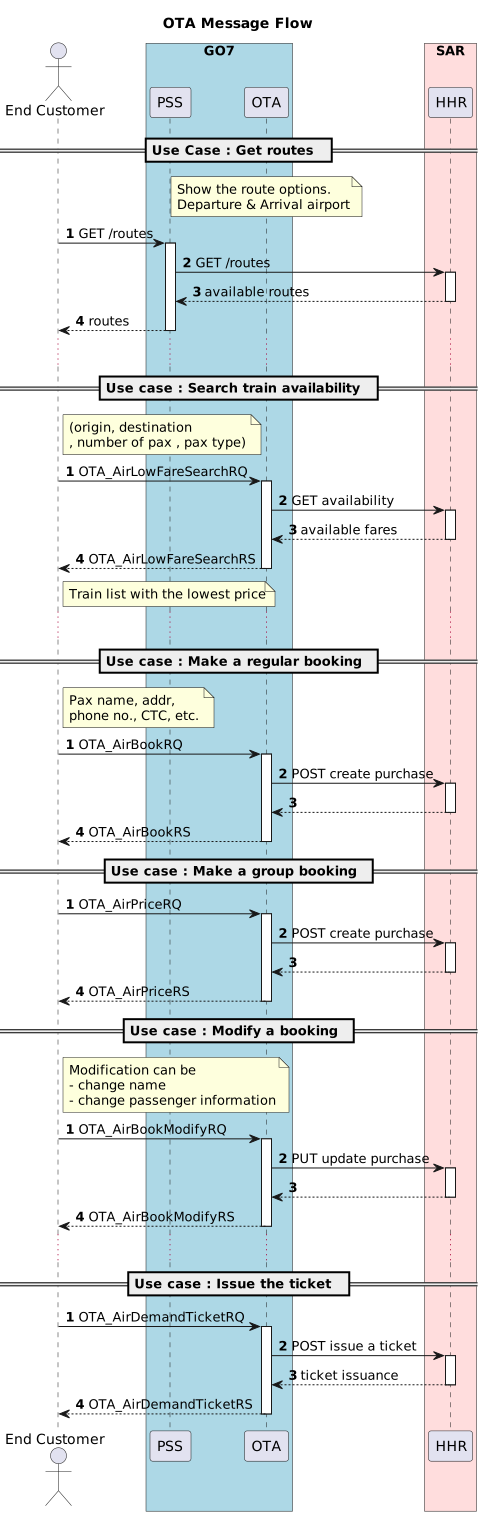
This diagram illustrates the API call sequence for searching available trains, creating a reservation, and the intermediate steps required to issue tickets.
Authentication
This section provides the procedures necessary for authorized access. Refer to this section for credentials information and endpoints for the authentication.
There are two authentication types:
API KEY
The API key should be attached to the HTTP request as X-API-Key HTTP header.
Never deploy your key in client-side like browsers or mobile apps as it allows malicious users to take that key and make requests on your behalf.
| API KEY |
| 8cee91a8-4d2c-47e5-b174-xxxxxx |
Request
curl -X POST \
    {base_url} \
    -H 'x-api-key: {api_key}' \
    -H 'local-name: {local_name}' \
JWT
| |
Production |
Test |
| Identity Provider |
https://api.sar.worldticket.cloud/auth |
https://test-auth.worldticket.net/auth |
Before calling any OTA method it’s mandatory to get access and refresh tokens from the Identity Provider.
Replace all variables in curly braces with the actual values.
| Variable |
Description |
Example |
| base_url |
Identity provider URL |
https://test-auth.worldticket.net/auth |
| tenant |
Short airline name stands for realm |
test-rs3 |
| client_id |
Application ID |
sms4 |
| client_secret |
Application secret |
33357c21-3233-4eb3-a420-**** |
| username |
User login |
username |
| password |
User password |
**** |
Authentication Request and Response
Request
    curl -X POST \
    {base_url}/realms/{tenant}/protocol/openid-connect/token \
    -H 'Content-Type: application/x-www-form-urlencoded' \
    -d 'grant_type=password&client_id=sms4&client_secret={client_secret}&username={username}&password={password}'
Response
    {
      "access_token": "eyJhbGciOiJSU...",
      "expires_in": 7200,
      "refresh_expires_in": 14400,
      "refresh_token": "eyJhbGciOiJ...",
      "token_type": "bearer",
      "id_token": "eyJhbGciOiJ...",
      "not-before-policy": 1565113348,
      "session_state": "89fde8f3-39ff-436e-9dce-99387c591fda"
    }
OTA XML Schema 2015
Download OTA XML Schema 2015
Postman Collection
Download Postman Collection
Please update the variables in collection such as apiKey, agent_id, agent_name and tenant.
Code Lists
Booking Class
| Class |
Description |
HHR Booking Class |
| Y |
Economy class |
T |
| C |
Business class |
P |
Passenger Type
| Code |
Description |
HHR Code |
| ADT |
Adult |
1 |
| CHD |
Child |
2 |
| INF |
Infant |
3 |
Document Type
| Code |
Description |
| 2 |
Passport |
| 5 |
National ID |
Available Routes and Flights Calendar
| |
Production |
Test |
| Routes & Flights |
https://api.sar.worldticket.cloud/sms-gateway-service |
https://test.worldticket.net/sms-gateway |
OTA for Reservation workflow
| |
Production |
Test |
| OTA API |
https://api.sar.worldticket.cloud/ota/v2015b/OTA |
https://test-api.worldticket.net/ota/v2015b/OTA |